BoQ reviewStage 6
Check the BoQ before it goes out
Jakob checks your bill of quantities against drawings, reports and enclosures, against VOB/C and against the BoQs of the other trades. Every finding with its evidence in the original.
IN ONE SENTENCE
You upload the BoQ and press Check. Jakob shows contradictions, gaps and missing details before a bidder turns them into a claim.
- Against the BoQ’s own documents
- Evidence in the original
- One list, sorted by confidence
JAKOB FOR BOQ REVIEW
Whatever the BoQ leaves out comes back later as a claim. Jakob finds it first, in the drawings, reports and enclosures that go out with the BoQ.
Why it pays off
Claims cost money
Bidders already check your BoQs with AI, looking for claims. Do it first: Jakob finds the gaps before the BoQ goes out.
Worked out for €10m construction cost
New build
Average claims 6%
€600,000
of which avoidable
over €300,000
Refurbishment
Average claims 17%
€1.7m
of which avoidable
over €850,000
Court of Audit Baden-Württemberg, Denkschrift 2020, contribution 17: 48 completed state buildings
The Court of Audit counted
It examined 48 completed state buildings. Claims averaged 6 % of construction cost in new builds and 17 % in refurbishments. More than half would have been avoidable with more careful groundwork and design.
Bidders already use AI
Contractors have AI search your BoQ for gaps and claim potential. A bidder who knows the gap prices it in.
The client asks why
A claim from a gap in the BoQ lands with the designer: why was this work not in it?
The same check, only first
Jakob reads your BoQ the way a bidder does: against drawings, reports, VOB/C and the other BoQs. Only before it goes out, with evidence for every finding.
Step 01
Check before tendering
Every item against drawings, reports, structural input and model, plus VOB/C and the other BoQs.
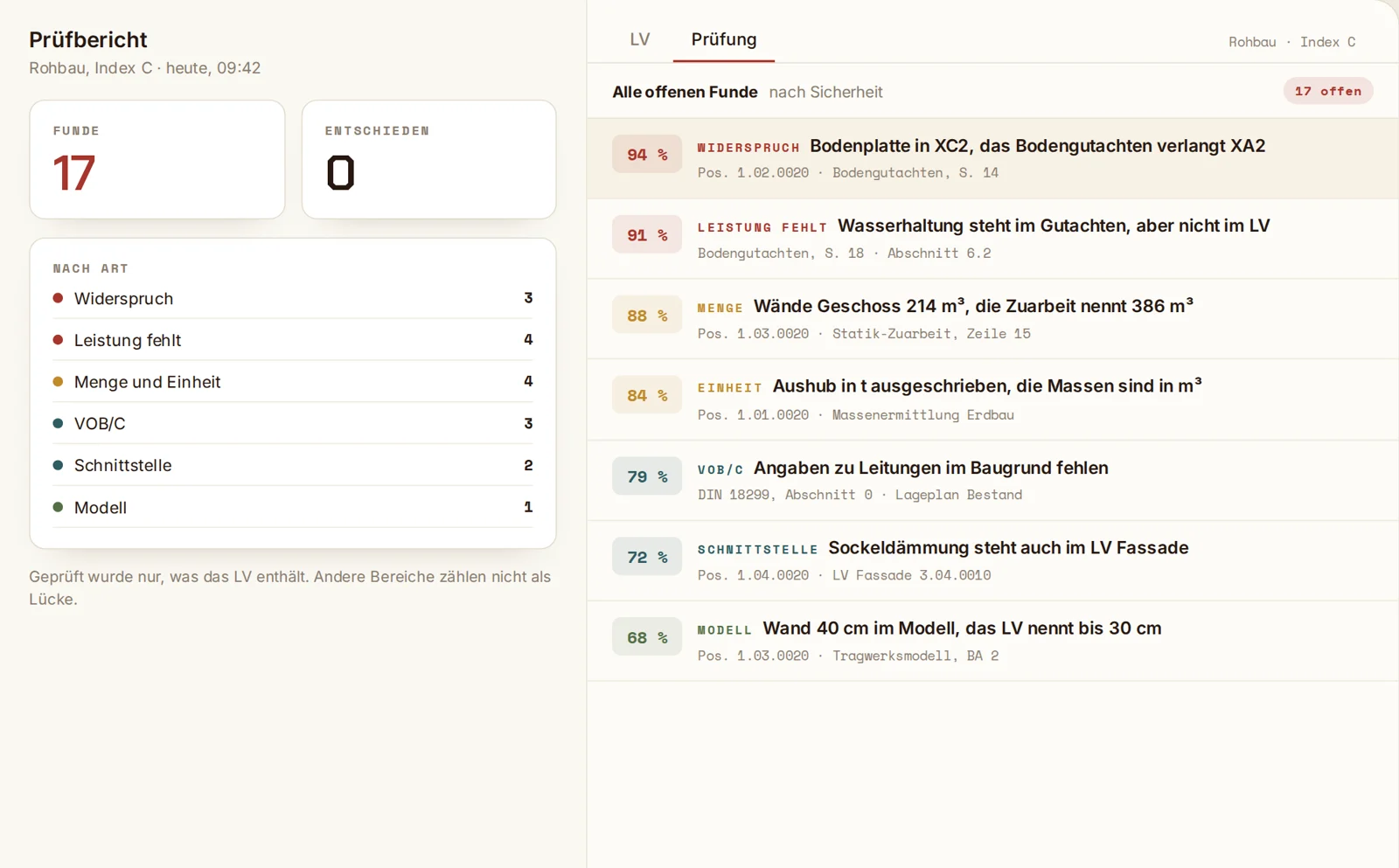
One list, by confidence
All findings in one list, the most certain on top. Each shows how sure Jakob is and which document it comes from.
Contradictions and gaps
The BoQ says XC2, the soil report requires XA2. Or dewatering is in the report but missing from the BoQ.
Required details per VOB/C
What DIN 18299 and the trade’s ATV require in section 0 and is neither in the BoQ nor in the preliminary notes.
Quantities and units
Quantities against structural input and model, units against the take-off. Arithmetic errors show up as well.
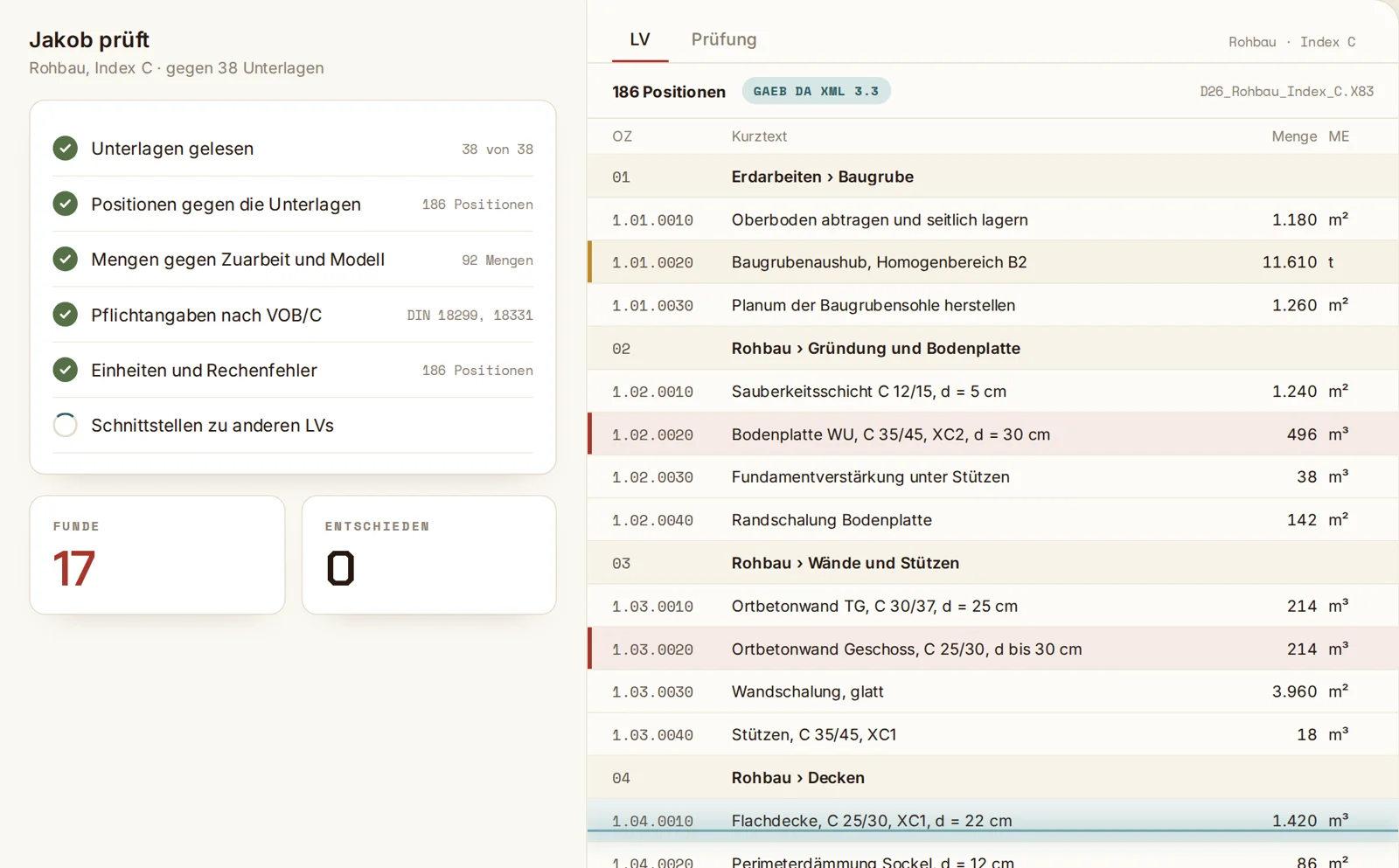
Across trades
Jakob puts the project’s other BoQs alongside. What is in no BoQ, and what is in two, goes on the list.
Model as a cross-check
If there is an IFC model, Jakob checks quantities and wall thicknesses against it.
Step 02
Evidence and decision
Every finding shows its place in the original. You decide what goes into the BoQ.
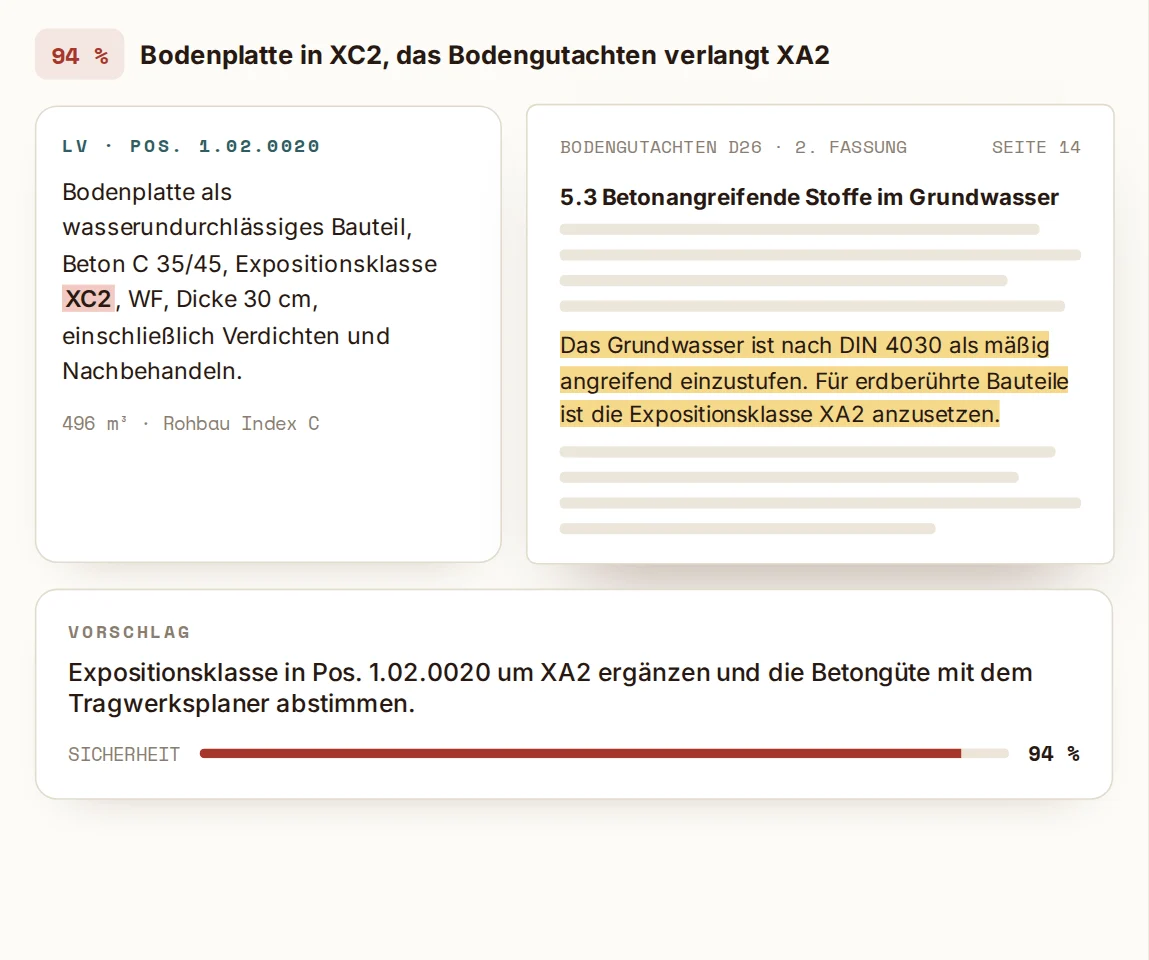
Evidence in the original
One click opens the document where the finding comes from. Next to it the BoQ item and a suggestion what to change.
94%
Confidence of the top finding
How certain
Every finding carries a confidence. You see what must be settled before tendering and what is only a note.
You decide
You mark each finding as justified or as no finding. Jakob records what is decided and what is still open.
Stays in your office
Checked in your own instance. BoQ and documents are not used for model training.
Frequently asked questions
Which documents does Jakob check against?
The ones that go out to the bidders with the BoQ. Jakob looks for the trade’s list of enclosures or dispatch list and takes those documents in their latest revision. Without such a list you choose the documents, with a suggestion from Jakob.
What does the check find?
Contradictions between BoQ and documents, work shown in drawings or reports but missing from the BoQ, differing quantities and units, arithmetic errors, missing required details per VOB/C and interfaces with the other trades’ BoQs.
How reliable are the findings?
Every finding carries a confidence in percent, and the list is sorted by it. For each finding you see the passage in the original and decide yourself whether it goes into the BoQ.
Which formats does Jakob read?
The BoQ as GAEB X83 or X81, in the older GAEB 2000 format (P83) or as PDF. Documents as PDF, Excel, Word and IFC.
Do we have to write the BoQ in Jakob?
No. You write the BoQ in your AVA software as before and upload it for the check.
Does Jakob replace the office’s own review?
No. Jakob reads every document against every item and gives you an ordered list. Your office decides what goes into the BoQ.